
Card Issuance
Extend your platform with card issuance to enable secure and flexible spending.
Card Issuance enables you to create and manage payment cards through a single integration. Using this capability, you can issue debit cards linked to customer accounts or prepaid cards funded before use and allow spending up to the available balance on the card, depending on your program requirements. The behavior of each card (such as format, issuance flow, and controls) is governed by your configured Card Program.
Each issued card can be configured with program-level controls such as spending limits, usage rules, and lifecycle management. This allows you to build card experiences tailored to your platform, whether for customer payments, business expenses, or controlled spending programs.
Through the unified Card Issuance APIs, you can:
- Issue physical or digital cards
- Configure spending rules and limits
- Manage card lifecycle events such as activation, freezing, and replacement
- Enable secure payments across online, in-store, and mobile wallet channels
Example use cases
Card Issuance can support a variety of business scenarios. Depending on your platform’s needs, you can issue cards to enable different types of spending experiences for your customers or internal users.
Issue cards to employees to manage business expenses with configurable spending controls.
Provide debit cards linked to customer accounts for everyday purchases and ATM withdrawals.
Distribute pre-funded cards for controlled spending across specific programs or initiatives.
Supported card models
The platform supports multiple card funding models, allowing you to choose how funds are accessed during card transactions.
Debit cards (account-linked)
Debit cards are directly linked to the cardholder’s active account. Transactions are authorized in real time against the available balance of the linked account, providing instant access to funds.
Common use cases:
- Everyday consumer spending
- Business operational expenses
- ATM withdrawals
- Retail purchases
Prepaid cards (pre-funded)
Prepaid cards are funded with a specific allowance before they can be used.
Instead of accessing the full account balance, these cards only allow spending up to the allocated funded amount, making them useful for expense control.
Note: Prepaid cards are supported only for Business Customers. Individual customers can only be issued Debit cards.
Common use cases:
- Employee expense cards
- Controlled spending programs
- Corporate budgeting workflows
Card formats
Once you choose a funding model, you can decide how the card will be delivered to users.
| Card Type | Description | Use Case |
|---|---|---|
| Physical Card | A physical card shipped to the customer for in-person purchases and ATM withdrawals. | Retail spending, ATM withdrawals, everyday card usage |
| Digital Card | A virtual card issued instantly and accessible online or through mobile wallets. | Online purchases, subscriptions, instant card access |
| Digital-First Card | A digital card issued immediately, with the option to request a physical card later or issue both together based on configuration. | Immediate access while waiting for the physical card |
Mobile wallet support
Digital and Digital-First cards support push provisioning, allowing users to add cards directly to mobile wallets such as:
- Apple Pay
- Google Pay
This enables customers to make secure contactless payments immediately after card issuance.
How card issuance works
Issuing a card involves selecting the right card program, identifying the cardholder, and configuring how the card should be issued and used. The following workflow outlines the typical steps involved in setting up and issuing cards.
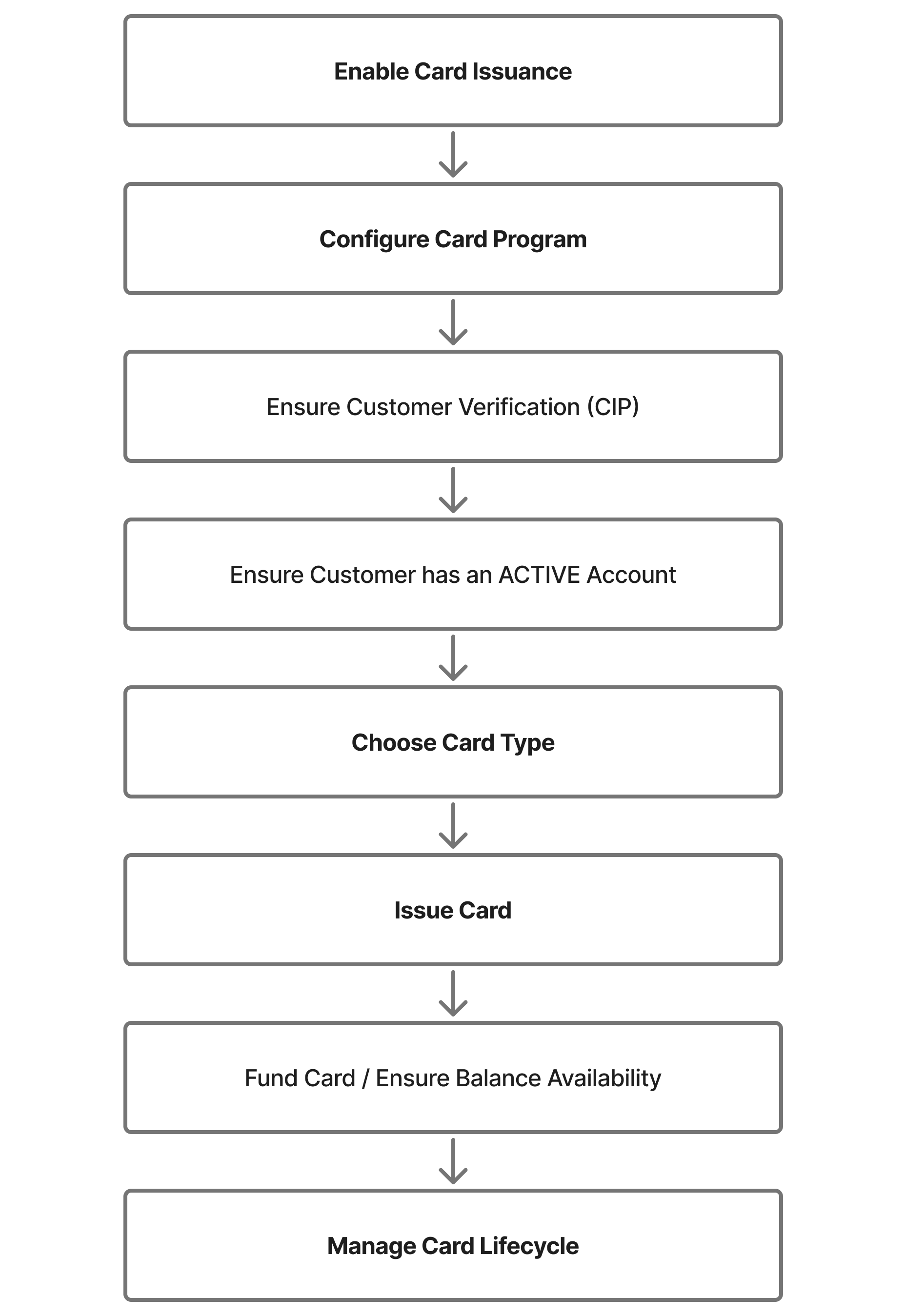
Contact the PCE Account Management team to enable the Unified Card Issuance capability for your program.
Define your Card Program, which acts as a master configuration template for all cards issued under your program.
This setup determines:
- Spending rules
- Transaction limits
- Program policies
- KYC and compliance requirements
The PCE Account Management team will assist in configuring this setup.
Determine which customer or user will receive the card.
The selected cardholder must:
- Have an ACTIVE account
- Successfully pass Customer Identification Program (CIP) checks
Use the Card Issuance API to create a Debit or Prepaid card for the selected cardholder.
Ensure funds are available for card transactions.
- Debit cards: Transactions draw funds from the linked account balance.
- Prepaid cards: Funds must be loaded onto the card before use.
After issuance, you can manage cards through their lifecycle by performing actions such as:
- Freezing or unfreezing cards
- Replacing lost or stolen cards
- Reissuing expired cards
You can configure spending limits and usage controls to regulate how the card can be used.
Common scenarios
The following examples show common ways to use Card Issuance.
Scenario 1: Issue debit cards to individual customers
Give each customer a Passport Account and a linked debit card for everyday purchases, ATM withdrawals, and online payments. The card draws directly from the account balance.
Cards involved: Debit, Digital-first (virtual card issued instantly, physical card follows by mail).
Flow: Onboard the customer, open an account, issue a digital-first debit card, let the customer add it to Apple Pay right away, and the physical card arrives in 5-7 days.
See Issuing a Card for full request/response examples.
Scenario 2: Issue prepaid cards to employees for expenses
Issue prepaid cards to employees for travel and supplies. Each card is pre-funded with a set budget, and the finance team sets spend limits per card.
Cards involved: Prepaid, Digital (virtual card for online bookings, physical card for in-store purchases).
Flow: Create authorized users under the business customer, issue prepaid cards, load funds from the company's Passport Account, and set daily spend limits.
See Fund your Cards and Control Card Spend for details.
Scenario 3: Load prepaid cards for one-time disbursements
Pay out funds by issuing a prepaid card loaded with a set amount. The recipient spends it directly, without needing their own bank account.
Cards involved: Prepaid, Digital-first.
Flow: Verify the recipient's identity, issue a prepaid card under their business entity, load the approved amount, and the recipient begins spending immediately.
Updated about 2 months ago